SCRIP- TUITION SAVINGS PROGRAM
Earn $$$ for your GVCS tuition- just by running your errands!
Check out this overview of our Scrip program through Raise Right
What is Scrip?
Scrip is a program that enables families to earn rebates that can be applied as credit to their GVCS tuition bill or registration costs. Participants can earn rebates by shopping online through Raise Right, linking a bank card or credit card (MC, Visa, Discover or Amex) for local dining and purchasing gift cards to pay for everyday purchases in place of cash, checks, and credit cards.
Participants set up an account with Raise Right, then use any of the 3 options to start earning rebates. If purchasing gift cards, participants pay full cost, but cards are issued through Raise Right at a reduced price. The difference is an instant rebate for your tuition. It’s really that simple! Each retailer determines the rebate amount they offer for online shopping, gift card purchases and local dining purchases. Please refer to the Raise Right website or App for rebate amounts.
The ordering schedule for physical gift cards can be found on the Scrip Tab under Connect – Parents on the school website. Cards are shipped to school and participants are notified when orders are ready for pick up.
Rebates earned have no cash value and can only be applied to tuition or donated to the school. Rebates cannot be transferred to other schools.
Please note that GVCS does a 90/10 split of the gift card rebates earned, the 10% is retained to offset administrative costs of the program. The reports offered by Raise Right will show the full 100% rebate so please be sure to calculate the 90/10 split if you are checking your gift card earnings balance.
Payouts are offered in December, March (registration) and May. Credits do not expire and continue to accumulate until a participant requests a payout.
The chart below is an example of what an average family can earn monthly in rebates.
Rebate | Total Spent | Rebate Earned | Family Credit (90% of rebate value) | |
Grocery | 3% | $500 | $15.00 | $13.50 |
Gas | 3% | $300 | $9.00 | $8.10 |
Dining Out | 8% | $100 | $8.00 | $7.20 |
Clothing | 8% | $100 | $8.00 | $7.20 |
Wal-Mart /Target | 2.5% | $200 | $5.00 | $4.50 |
Home Improvement | 4% | $100 | $4.00 | $3.60 |
TOTAL |
| $1,300 | $44.10 |
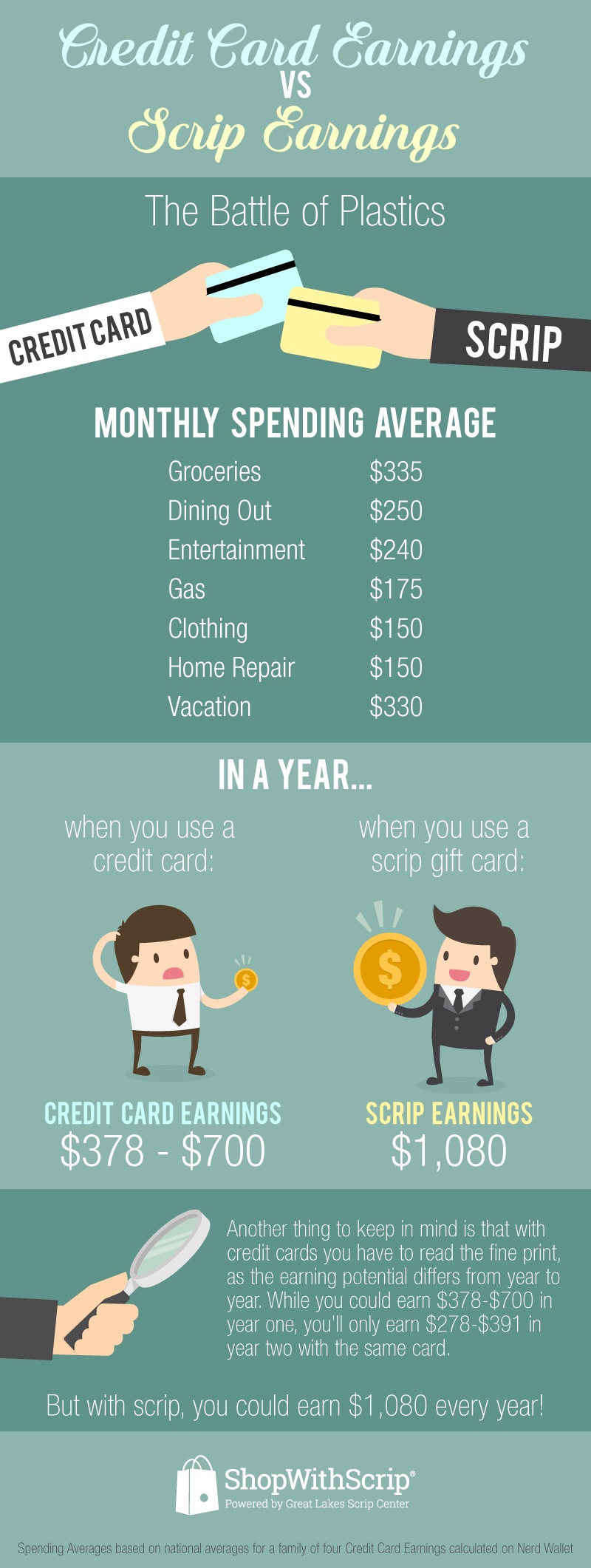
Based on this example, the annual tuition credit would equal $529.20. Money easily saved with only a small amount of planning. On average, Scrip rebates pay higher rewards than your credit card does! If you need even further convincing, here are some REAL and recent examples of tuition credits issued to individuals who are participating in the GVCS Scrip Program:
- Participant 1: Credit Earned from 2/9/24 to 2/9/25 = $1,369.70 registration credit
- Participant 2: Credit Earned from 2/9/24 to 2/9/25 = $846.23 registration credit
- Participant 3: Credit Earned from 4/26/24 to 11/25/24 = $506.21 tuition credit
Ready to get started? Refer to the Instructions on the Get Started with Scrip link
Q: How Do Physical Gift Card Orders Work?
A: Physical Gift cards are not available for instant use like eGift Cards and Reloads. When you place an order for physical gift cards, your order will go into a queue and remain there until the Scrip Coordinator submits the orders to Raise Right. The coordinator submits orders according to the dates listed on the ordering schedule. The most current schedule can be found on the GVCS Website – Connect - Parents- Scrip Updates. We submit bulk orders to help save on shipping costs and maximize the savings to our families. Once the order is submitted, it takes Raise Right a few days to process the order and ship the cards to GVCS. During this time, scrip volunteers also order and pick up needed cards from our
local retailers, such as Fareway and Hyvee. We do our absolute best to get your scrip order in your hands as soon as possible. Our order deadlines are on Fridays at 1pm and our goal is to have your order filled by the following
Tuesday. Raise Right now also offers a Ship to Home option on select cards. If you choose this option, you will be charged a shipping fee on your order and cards will be delivered to your home in 7-10 business days.
Q: Can I order Physical Gift Cards at Any Time?
A: There is nothing that prevents you from ordering physical gift cards at any time, but unless you choose the “Ship to Home” option (only available on select cards), your order will remain in the coordinator queue until the next deadline noted on the Scrip Ordering Schedule.
For example, if today is July 15, 2025 and the next GVCS ordering date is July 22, 2025, your order will remain in the coordinator queue from July 15th until July 22nd. You can submit your order for physical cards any time before July 22nd at 1pm but you will be charged for your order when it is submitted. Some individuals prefer to place their orders closer to the ordering due date to prevent their funds from being tied up for a
longer period of time.
Q: Is Paying with your Bank Account Safe?
A: Yes. I have used my bank account to pay since our scrip program started in May 2016 and have never had any issues. However, if you are uncomfortable linking your main bank account to scrip, our suggestion is to set up a separate bank account that you can transfer funds into and use only for Scrip. We do have participants that have chosen to go this route.
Q: Do you accept checks?
A: No, we do not accept checks. We use Scripware, a software program offered through Raise Right to manage our program. The software does show a “pay by check, given to coordinator” option at check out. We do not own the software so we cannot remove this option from the payment screen, but unfortunately, we do not accept checks. If you place an order and mark “pay by check”, we will cancel your order and notify you that it has been cancelled. The payment options we accept are presto pay ($.29 convenience fee), bank cards (1% of total order convenience fee) and credit card (3% of total order convenience fee).
Q: Is my rebate earned when I purchase the gift card or when I redeem the gift card?
A: All rebates are earned at the time the gift card is purchased, not when the gift card is redeemed.
Q: How to my credits get applied to my tuition statement?
A: We offer payouts in February (registration), May (tuition), and December (tuition). When payout time approaches, the Scrip Coordinator will send an email regarding the payout and you will just need to respond to the email stating you want to be included in the payout. Your coordinator will calculate your payout and email you the amount of credit that will be applied to your statement. Your credits do not expire and will continue to accumulate until you choose to have them applied to your statement. The scrip coordinator only calculates your credit while processing the payout. If you would like to have an idea of what your payout is, please see the instructions here or below: Scrip - Grand View Christian School - Des Moines, IA
Note: Rebates earned have no cash value and can only be applied to tuition or donated to the school.
Rebates cannot be transferred to other schools.
Q: How do I calculate my Scrip Payout?
A:
1. Log into your account at www.raiseright.com
2. On the top right corner of the page, click on Account, then choose Personal Dashboard from the menu that comes up
3. Click on Earnings Summary Report.
4. On this screen, there are 3 reports to choose from in the drop down box. All 3 will pull your same earnings total, they just differ in the detail they provide. You will need to customize your report begin date to be the day following your last payout (the start date will be 7-23-21 for those of you who do an annual August payout). If you have never done a payout before, you can either use your enrollment date or 5/1/16 (when we started our scrip program) as the begin
date.
5. Remember that this report shows the full rebate, so you will need to manually calculate the 90/10 split.
Q: Why does GVCS retain 10% of my earned gift card rebate?
A: There are administrative costs to the Scrip Program. We have costs for using the software that helps us manage the program, shipping fees, banking fees, local vendor fees and office supply fees. Unlike other schools, our program is run by volunteers to help keep our fees at a minimum.
1. Log into your account at shopwithscrip.com.
2. Click on the dashboard tab at the top of the page.
3. Click on Family Functions from the menu bar on the left hand side of the page.
4. Under Family Functions, choose Reports.
5. Choose Family Order History Report.
* For Report Begin and End Dates, Choose Custom Range.
- For Begin Date: if you have had a scrip payout previously and are unsure of the exact date, you will need to refer to your last payout report. I email these out each time someone requests a payout. The report has the payout dates listed on it. If you have never used a scrip payout, you can use 5/1/06 as the begin date, this is when our program started.
- Use the current date as the End Date.
6. Run the Report. At the bottom of the report, it will give the scrip rebate total. This total does not account for our 90/10 split so you will need to manually calculate that. For example, if the report shows your rebate total is $500, you will need to multiply that by 90%, (or 0.90) to get your actual credit amount of $450. We do have administrative costs for the program, such as shipping fees and software costs, so we retain a portion of the rebates to cover these costs.
Rebates earned prior to 9-1-2020 are still subject to the 80/20 split.